
Controlled hunt navigation
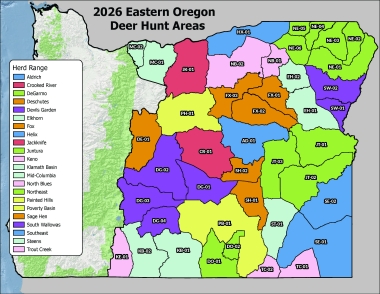
Eastern Oregon mule deer are managed by Deer Hunt Areas. Check here for more details
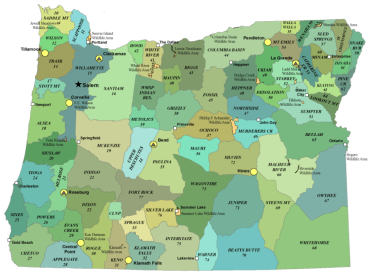
All other big game are managed by wildlife management units, including west side hunts. Refer to specific map units below. Find additional resources here
How to apply for a controlled hunt
Step-by-step directions to apply for a controlled hunt online and how to change your hunt choices. The deadline to apply for a big game controlled hunt is May 15.
How the controlled hunt draw works
Most tags (75 percent) are awarded based on preference points. Every year you don't draw your first-choice tag on deer, elk, pronghorn and spring bear hunts, you receive a preference point for that series, which increases your odds the following year. The remaining 25 percent of tags are awarded randomly amongst all remaining first-choice applicants, so you always have a chance to draw your first-choice hunt. Controlled hunts are divided into hunt series based on species, and then further divided into hunt numbers based on unit/location. Hunters can apply once in each hunt series each year.
Hunt application series:
100 – Buck deer
200 – Elk
400 – Antelope
500 – Bighorn sheep (no preference points awarded for sheep hunts)
600 – Antlerless deer
700 – Spring black bear
900 – Rocky Mountain goat (no preference points awarded for goat hunts)
How to apply for a controlled or premium hunt online
- Purchase series application
1. Log in to your MyODFW account *(valid hunting license is required)
2. Go to "Purchase from catalog."

3. Select "Controlled hunts" under "Big game hunting" from the category drop down on the top row, or type "application" in the search bar.

4. Select "Add to cart" ALL of your series applications. Once ALL of your series applications have been added to the cart, select "Proceed to checkout."

5. Click "Complete" in the cart to fill in hunt application,

a pop up with ALL the applications that need to be completed will display. Select "Complete" for each one.

Hint: You must select all series application types of controlled hunts that you want to apply for and then proceed through checkout to make hunt number selections.
6. Choose Individual, Group Leader or Group Member.

7. Choose "Point Saver" or enter in hunt #'s in "Hunt Choices." Once all the choices are entered select "Next."

8. Verify the application is correct, select "Save." If the application is incorrect select "Edit" and reenter the correct hunts or group status.

9. When all applications are completed a green checkmark will display. Select "Save" to finalize.

10. Then "Pay Now" to enter the payment screen.

How to select a hunt
- Drawing odds
Step 1: Choose a hunt
Controlled hunts are broken down by species and location. All hunts are listed in the Oregon Big Game Regulations, and each hunt has a unique hunt number. You can choose up to five hunts per series (1st choice, 2nd choice, 3rd choice, etc.), though most tags run out after the second-choice drawing is completed.
You can get an idea of your odds of drawing a hunt by looking at the Big Game Regulations, where you will see the number of tags and number of first-choice applicants from the previous year. The number of tags and applicants can change from year to year, but usually not by much. A point to consider, hunts that have more first-choice applicants than tags available will never be drawn as anything other than a first-choice hunt.
ODFW's online Point Summary Reports can also help you figure out your odds.
How the draw works
- Each application purchased is assigned a random 7-digit number, viewable on June 2nd.
- Members of the public are invited to ODFW headquarters to randomly choose a 7-digit draw seed number for each hunt series. (Call: (503) 947-6101 to participate in the drawing.)
- Applicants for each hunt are grouped by preference points and first-choice hunt selected.
- Tags are awarded in each preference point group beginning with the applicant whose 7-digit number matches, or is closest to and above, the seed number. The selection continues with the applicant having the next higher 7-digit number, until 75 percent of the tags have been awarded or until all first-choice applicants have received tags.
- All remaining first-choice applicants are rearranged solely by 7-digit random number and the remaining 25 percent of tags are awarded randomly among all first-choice applicants for the hunt.
- If there are tags left, the process restarts for second-choice hunt applicants. (Preference points are not a factor for awarding 2nd, 3rd, 4th and 5th choices.)
- Any applicant who failed to draw their first-choice tag is awarded a preference point for the next year's draw; the point will appear in the system on January 1 of the following year.
Keep in mind that 25 percent of the tags for each draw are awarded randomly so every first-choice applicant has some chance to draw even the most coveted tag.
Step 2: Decide if you're applying as an individual or in a party
Many hunters choose to join together with family and friends and apply for a hunt as a party. This means that either everyone in the party will draw a tag or no one will. When applying as a party, individual preference points are combined and then averaged for the group. If you are new to hunting, it helps to go with more experienced family and friends. Keep in mind that if you are just joining a long-established hunting party, your low points could reduce their chances at drawing a tag. (Make it up to them by being a good addition at hunting camp!) Group members must submit their group leader's ODFW ID# on their application.
Step 3: Purchase a valid hunting license
To apply, you must first purchase an annual hunting license. You may purchase the hunting license at the same time you apply for a controlled hunt.
Step 4: Complete your tag application and apply by May 15 11:59 p.m. PT
Once you have completed steps 1-3 above, you are ready to apply for your tag. You can apply online, at a license sales agent, or at ODFW offices that sell licenses. Use the Oregon Controlled Hunt Application Worksheet (pdf) to organize your information.
Get your application right - simple mistakes can derail your chances of drawing a tag. Triple-check your hunt number (and party leader's number if applying with others) to make sure they are correct. Also, be sure to include a daytime telephone number and E-mail so our licensing staff can reach you if there is an error. If you're applying at a license sales agent, check your application before you leave the store and get a receipt showing your hunt choices. Keep this receipt for proof of application.
Step 5: Wait for draw results
It's easy to check your results, and purchase your tag, on the ODFW electronic licensing system. NOTE: Once the draw results begin loading into the system, they will load one series at a time. If you want to see all of your results at once, wait until the end of the day when all the series have been loaded.
Controlled hunt draw results are announced by June 12 each year.
How to check your results online
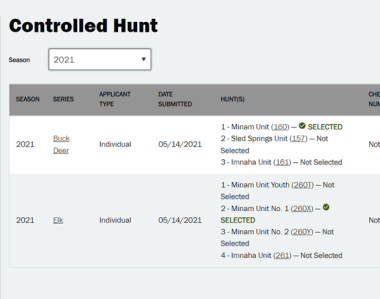
If you have an ODFW account, you can check your results online (you cannot check your results through the MyODFW app). Login to your full profile and under Recreational Portfolio click "Controlled Hunt."

If you drew a tag, you will see the term "Selected" next to your hunt choice. If you didn't draw a tag you will see "Not Selected" next to your hunt choice.
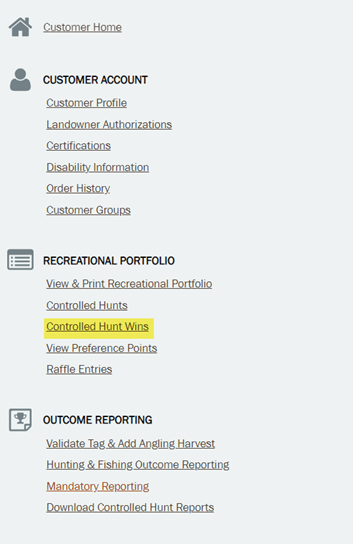
An alternative method from the Recreational Portfolio screen is to select "Controlled Hunt Wins."
On this screen you'll see the hunts for which you were successful.

If you were "selected," proceed to the Purchase a Product and select "Big Game Hunting." From here, you can add the hunt that you were selected for.
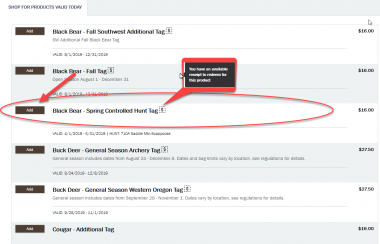
If you purchased a Sports Pac, the item will come up as a $0 charge when you add it to your cart. If you did not purchase a Sports Pac, you will need to pay the tag fee shown in the cart.
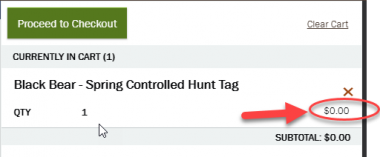
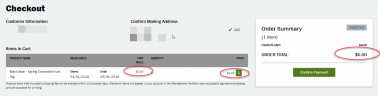
Proceed to checkout and confirm payment.
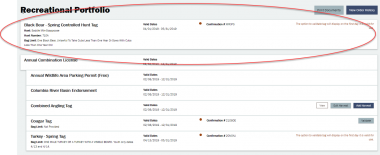
Once the tag has been purchased, you will be able to see it in your Recreational Portfolio online or in the MyODFW app. Note: You will be able to see that you purchased a tag, but you won't be able to validate it until just before your hunt.
Other ways to get your results
If you do not have an ODFW online account, you can check your results at a license agent, or by calling ODFW licensing at (503) 947-6101 during regular business hours.

How to view the seed numbers:
- The seed number relates to the application number you receive when you apply for a tag. The seed number is where the draw begins and it proceeds numerically, eventually circling back through the smaller numbers.
- Having an application number close to and slightly bigger than the seed number DOES NOT mean you will be drawing a tag.
- The final draw results also take into account preference points, residency, party numbers, etc.
- Seed numbers are selected randomly through a process that is witnessed and verified by three volunteers (not ODFW staff).
Step 6: After the draw
If you drew the tag, congratulations!
Important note: purchase your tag (or redeem your sports pac voucher for your tag) prior to the deadline, the day before the hunt begins.
If you didn't get your first-choice hunt, you now have a preference point for that hunt series building your odds in next year's draw. Points are affiliated with a hunt series, not a specific hunt location number, so even if you change your mind and choose a different area to hunt next year, your point will count toward your new choice.
You can use the point summary reports for previous years to better determine how to use your point(s) next year. You may find the how to read a point summary report article helpful for understanding point summary reports.
Make changes to your application
- Hunt plan detoured
A controlled hunt application that needs to be changed can be done in the customer's online account by the customer through May 25. The customer can make as many changes as they want with no additional fees.
Step 1: From the customer home screen select Controlled hunts.

Step 2: Select the Edit button for the Series you are making changes to.

Step 3: Here you will be able to edit the Status of the Party Member/Leader/Individual and Hunt choices In the application itself you can change/add hunt choices or make it a Point Saver only application.

Premium Big Game Hunts
- What Premium Hunts offer
- A long hunting season during the peak of the rut (Aug. 1 to Nov. 30).
- No preference point advantage. All applicants have an equal chance to draw a tag.
- An additional tag on top of your controlled hunt or general season tag.
- Same price as a regular controlled hunt or general season tag.
- Open to nonresident hunters.
What's available
- Premium deer hunts (L series), one tag available in every wildlife management unit. Tag is good for any species of deer that's legal to hunt in that unit.
- Premium elk hunts (M series), one tag in all but three units.
- Premium pronghorn antelope (N series), one tag available in 27 areas.
See the Oregon Big Game e-Regulations for a list of hunt numbers; they will correspond with series and unit, for example, the Premium deer hunt in Applegate Unit is L28 and the Premium elk hunt is M28. Note: some hunts (highlighted in red in regulations) are mostly on private lands so make sure you arrange for access before applying.
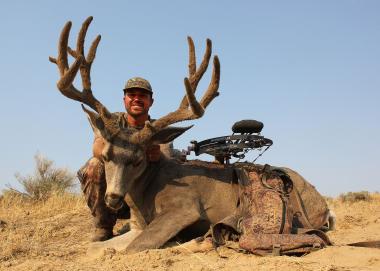
Photo by Tiffany Cruickshank Apply for more than one hunt
You can apply for tag in each series (deer, elk and pronghorn) and list a 1st – 5th choice hunt in each series, similar to regular controlled hunt applications. Usually just one hunter will draw their 1st choice in each unit, but we suggest you list at least a 2nd choice hunt in case there is a hunt cancellation or other change.
Apply every year – even if you've drawn before
Premium tags are not once-in-a-lifetime tags. You can apply each year, even if you've drawn a Premium Hunt in the past.
How to apply
Apply the same way you apply for controlled hunts -- online, license sales agent or ODFW office that sell licenses. The application cost is per series and the deadline is May 15.
Not available to
- No party or group hunts
- Through LOP, guide and outfitters, or active duty military programs.
Funds support hunter's
ODFW uses the money raised through Premium Hunt sales for special projects that help big game populations throughout the state, which in turn provides more hunting opportunity.
How to check your controlled hunt draw results
It's easy to check your results and purchase your tag on the ODFW electronic licensing system. Login
NOTE: Once the draw results begin loading into the system, they will load one series at a time. If you want to see all of your results at once, wait until the end of the day when all the series have been loaded.
Controlled hunt draw results are announced by June 12 each year.
- How to check your results online
If you have an ODFW account, you can check your results online (you cannot check your results through the MyODFW app). Go to your profile and under Recreational Portfolio click "Controlled Hunt."

If you drew a tag, you will see the term "Selected" next to your hunt choice. If you didn't draw a tag you will see "Not Selected" next to your hunt choice.

An alternative method from the Recreational Portfolio screen is to select "Controlled Hunt Wins."

On this screen you'll see the hunts for which you were successful.

If you were "selected," proceed to the Purchase a Product and select "Big Game Hunting." From here, you can add the hunt that you were selected for.

If your purchased a Sports Pac, the item will come up as a $0 charge when you add it to your cart. If you did not purchase a Sports Pac, you will need to pay the tag fee shown in the cart.

Proceed to checkout and confirm payment.

Once the tag has been purchased, you will be able to see it in your Recreational Portfolio online or in the MyODFW app. Note: You will be able to see that you purchased a tag, but you won't be able to validate it until just before your hunt.

- Other ways to get your results
If you do not have an ODFW online account, you can check your results at a license agent, or by calling ODFW licensing at (503) 947-6101 during regular business hours.
2026 SEED NUMBERS
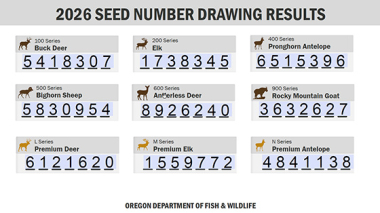
How to compare the seed numbers to your random application numbers:
- The seed number relates to the application number you receive when you apply for a tag. The seed number is where the draw begins and it proceeds numerically, eventually circling back through the smaller numbers.
- Having an application number close to and slightly bigger than the seed number DOES NOT mean you will be drawing a tag.
- The final draw results also take into account preference points, residency, party numbers, etc.
- Seed numbers are selected randomly through a process that is witnessed and verified by three volunteers (not ODFW staff).
Explore Related Articles

See the latest and historic data about big game hunting statistics for different hunts.

Where to hunt big game
All funds raised by deer and elk auction and raffle tags go directly to the Access and Habitat Program...

What hunters should know
Chronic Wasting Disease (CWD) is a fatal disease infecting deer, elk, and moose across North America. While CWD has not...

Find the latest Recreation Report
Current conditions and opportunities to fish, hunt and view wildlife. Updated weekly by fish and wildlife biologists throughout the state.